
Merchant Center has a new report that shows whether AI shopping assistants are recommending your products. If you sell products online, you’ve probably noticed something strange happening to how people shop. Fewer of them are typing a keyword into Google and scrolling through blue links. More of them are asking questions — to Google’s AI Mode, to the AI Overviews box at the top of search results, or to the Gemini app — the way they’d ask a knowledgeable friend. “What’s a good tent for camping with kids that’s easy to set up?” is a very different kind of search than “kids tent.”
Google just gave store owners a way to see how their products are doing in that new world. It’s called AI performance insights, and it lives inside Google Merchant Center — the tool businesses already use to list their products on Google Shopping.
Here’s what it is, why it matters even if you run a small business, and how to actually make sense of the numbers once you see them.
First, What Is Merchant Center?
Before we get into the new feature, a quick refresher for anyone who isn’t neck-deep in this daily: Merchant Center is the free tool where a business uploads its product catalog to Google — names, prices, photos, descriptions, stock levels, and so on. Google then uses that information to show your products in Google Shopping, in regular search results, and now, increasingly, in AI-generated answers.
Think of it as the ingredient list you hand to a chef. The chef (Google’s AI) can only cook a good dish — meaning, recommend your product to a shopper — if the ingredients you gave it are complete and accurate.
What’s Actually New
Up until now, if a shopper asked Gemini or AI Mode “which portable speaker has the longest battery life,” you had no way of knowing whether your product got mentioned, ignored, or mixed up with a competitor’s. It was a black box.
The new AI performance insights report opens that box up a little. It shows you three main things, broken down in plain terms:
- Share of voice — Out of all the times a product like yours could have shown up in an AI answer, what percentage of the time did yours actually appear? This is compared against similar brands, not your exact competitors by name.
- Where shoppers are in their journey — Whether people encountering your product are still figuring out what they want (comparing tent brands), or ready to buy (comparing your price against someone else’s).
- What shoppers are actually asking for — The specific words and phrases people use, like “easy setup” for a tent or “long battery life” for a lamp, and whether your product listing speaks to those exact concerns.
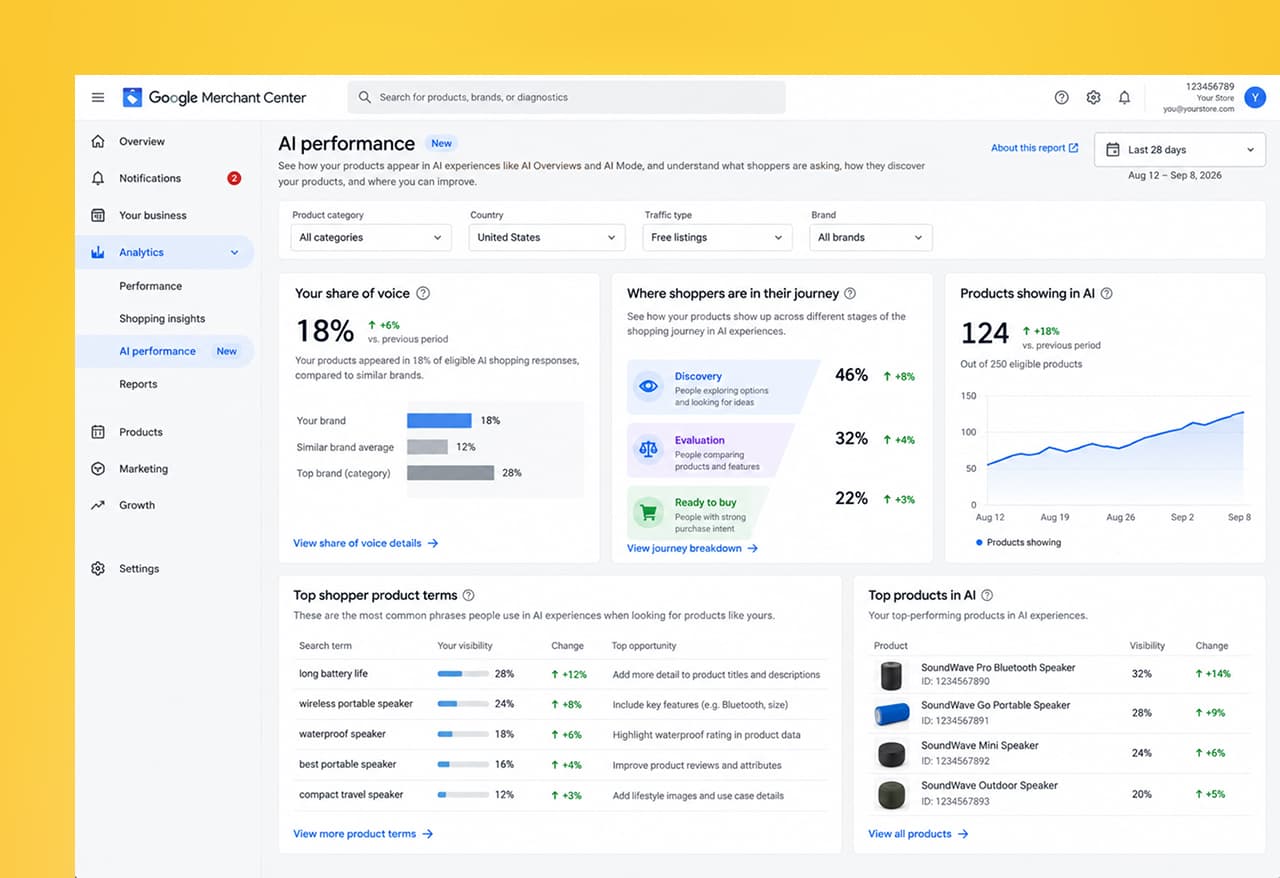
If your product data and shopping feed aren’t set up correctly, this new report is the closest thing you’ll get to a report card showing exactly where that’s costing you visibility.
Why This Matters Even If You’re a Small Business
It’s tempting to assume this is only relevant to giant retailers with data teams. It isn’t. Here’s the practical reason it matters:
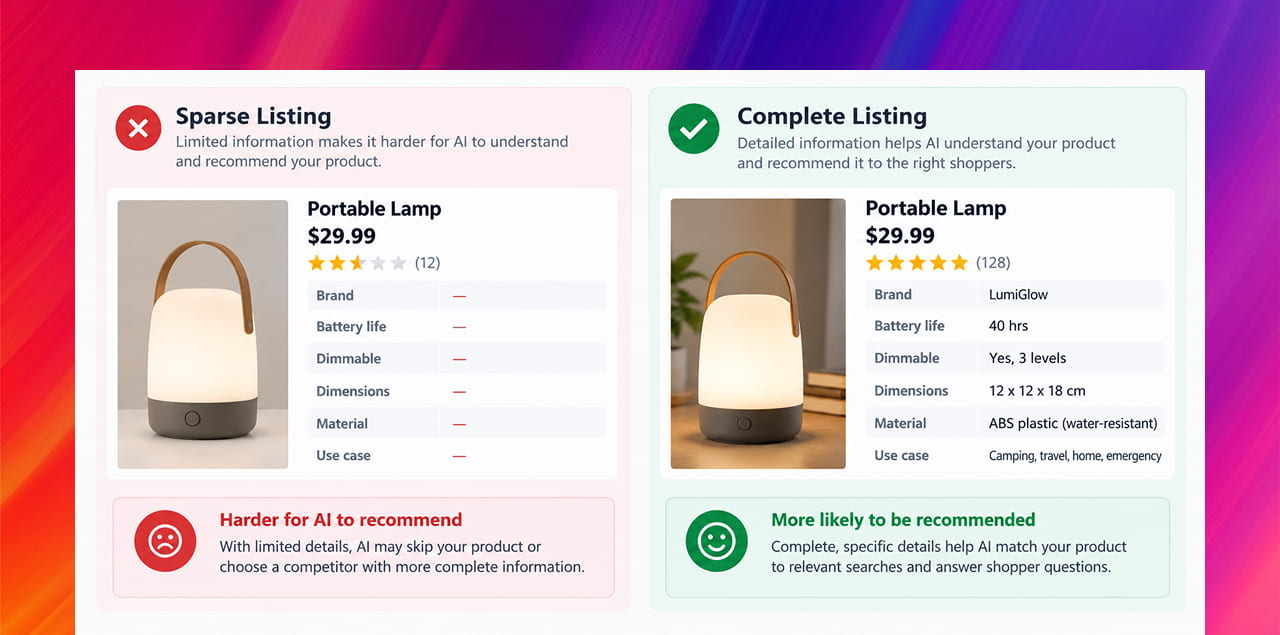
- AI answers tend to favor products with complete, specific information — dimensions, materials, use cases — over products with a bare-bones listing of just a name and price.
- A small business with a tightly written, detail-rich product feed can genuinely out-perform a bigger competitor who never bothered filling in the details.
- Right now, most competitors haven’t looked at this report yet, or don’t have access. Businesses that pay attention early have a real head start.
How to Actually Read the Report
If you have access to this report (it’s rolling out gradually — more on that below), here’s a simple way to work through it without getting lost in jargon:
- Start with share of voice. If it’s low, that’s your headline problem — your products simply aren’t being surfaced. Everything else is secondary until this improves.
- Look at the shopper journey stage. If most of your visibility is in the “just browsing” stage and almost none in “ready to buy,” it usually means your listing is good enough to get noticed but not detailed enough to close the deal — check whether your description actually answers a buyer’s final questions (returns, sizing, materials).
- Read the product terms list. This is the part most people skip, and it’s the most useful. It literally tells you the words shoppers are using. If your listing doesn’t contain those words, add them — in plain, natural language, not stuffed-in keywords.
- Check for gaps, not just numbers. A blank or vague attribute (color, weight, dimensions) is often a bigger drag on visibility than a slightly worse price.
A Word on Availability
This is still a fairly new rollout. Google has said it’s launching gradually across the US, Canada, Australia, India, and New Zealand, and not every Merchant Center account has access yet. If you log in and don’t see it under Analytics > Products > AI performance, that’s normal for now — it doesn’t mean anything is wrong with your account.
Quick Takeaways
- Google’s new AI performance insights report shows how your products appear in AI Mode, AI Overviews, and the Gemini app.
- It measures three things: share of voice, where shoppers are in their buying journey, and the exact words shoppers are searching with.
- Complete, detail-rich product listings tend to outperform sparse ones in AI answers — this rewards thoroughness over ad spend.
- The rollout is gradual, so don’t worry if you don’t see it in your account yet.
- Getting your product data in shape now puts you ahead of competitors who haven’t started looking at this yet.
Not Sure If Your Product Data Is AI-Ready?
Most product feeds were built for the old version of search — a name, a price, a photo, done. That’s no longer enough to win visibility in AI-driven shopping results. If you’d like a second pair of eyes on your listings to see where the gaps are, reach out through our contact form and we’ll walk you through it.