The browser as we know it—tabs, address bar, search engine—may be entering its next era. With the launch of ChatGPT Atlas, OpenAI is redefining what a browser can do: not just display pages, but actively assist, anticipate, and act on our behalf. It’s a bold shift that could transform our relationship with the web, for better or worse.
From Browsing to Conversing: How the Sidebar ChatGPT Changes Page Interaction
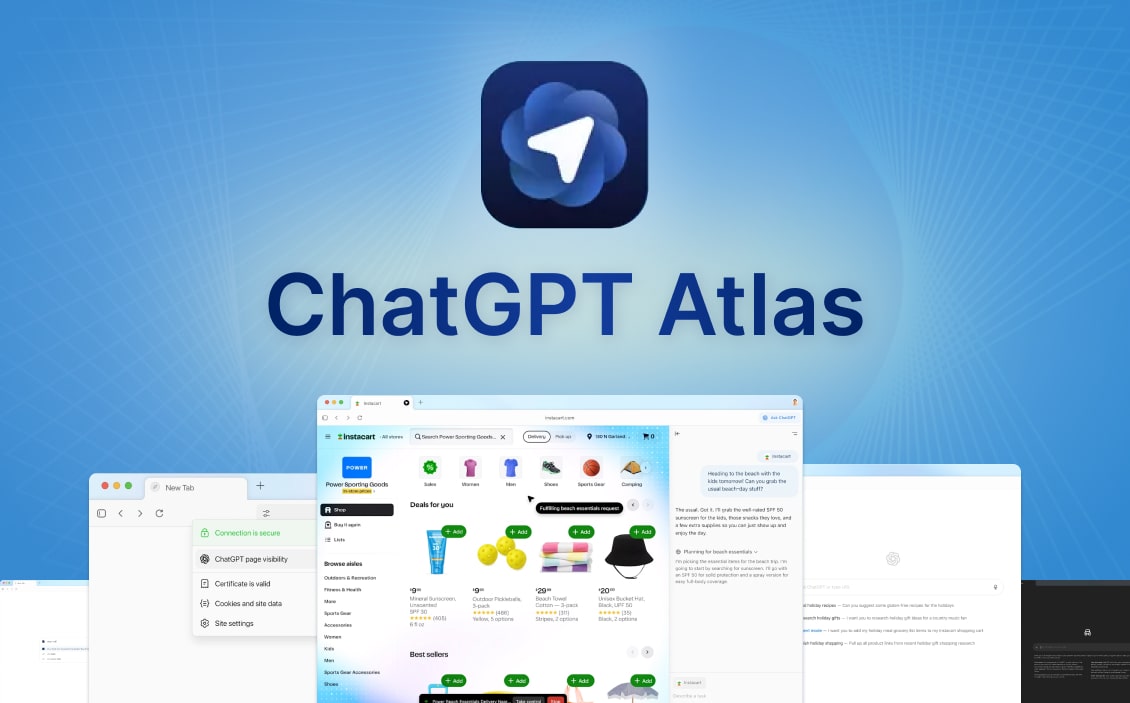
The typical workflow has long been: open tab → navigate → copy/paste into a chatbot → switch back. ChatGPT Atlas eliminates that detour. A ChatGPT sidebar sits beside your web page, ready to respond to whatever’s onscreen.
Imagine reading an article and the AI popping up with “Would you like me to summarise this?” Or browsing a product page and being asked “Would you like me to compare specs or check reviews?” Instead of being sidelined, the AI becomes a companion within the tab itself.
One demo showed Atlas opening with a multi-pane view: your content on the right, ChatGPT on the left, seamlessly integrated.
This shift makes browsing more conversational. You’re not just navigating; you’re conversing. The difference? Instead of the browser waiting for you to act, it responds and prompts you. That subtle change could mean fewer wasted tabs, less toggling between apps—and a browsing experience that feels far more fluid.
Agent Mode in Action: How ChatGPT Atlas Is Changing the Browser Experience
Atlas doesn’t stop at conversation. With its “Agent Mode,” the browser can act for you—booking flights, comparing options, filling forms. In one demonstration, the AI navigated to a shopping site, added items to the cart, and completed checkout steps.
Feature highlights:
- Memory: Atlas remembers the sites you visit, the context of prior searches, and uses that to personalize help.
- Actionable tasks: Not just suggestions, but actual automation—forms filled, tabs opened, workflows started.
- Unified interface: Instead of jumping between browser and chatbot apps, everything occurs in one window.
These capabilities push the browser from passive to proactive. Essentially, Atlas is asking: “How can I help you right now?” instead of waiting for you to request. For power users—researchers, multi-tab commuters, pros with dozens of browser windows open—the promise is compelling: less friction, fewer context-switches, more efficiency.
Privacy, Memory & Control: What Users Should Know Before Switching to Atlas
With great power comes important questions. When your browser is also a smart assistant, how are your tabs used? What data is stored? What control do you have? Atlas claims to give users significant agency—but still, the landscape raises new concerns.
Memory & personalization: Atlas can remember your browsing context and reuse it. For example: “Remember the job postings I pulled up last week and compare salary trends.” But the memory feature is optional and user-controlled.
Data usage: OpenAI emphasises that by default, the content you browse is not used to train models. You can clear memory or disable the feature altogether. With ChatGPT Atlas, browsing is becoming more contextual, intelligent, and task-driven.
Scope of action: Agent Mode is powerful—yet also risky. When you allow the assistant to carry out tasks (forms, log-ins, carts) you’re inviting your browser to act on your behalf. Users must weigh convenience against potential exposure. Wired aptly calls it “a browser that’s anti-web,” meaning it replaces some traditional web behaviors with AI-generated ones—users should know what they’re opting into.
Platform rollout & ecosystem: Currently, Atlas is available on macOS with other platforms (Windows, iOS, Android) promised soon.
Before making the switch, it’s wise to ask:
- Can I disable memory and have full incognito control?
- Am I comfortable allowing a task-agent to act in my name?
- Will legacy extensions or workflows on Chrome/Firefox render incompatible?
- Does the benefit of the AI-powered sidebar outweigh any potential privacy trade-offs?
ChatGPT Atlas isn’t just another browser—it’s an experiment in what browsing could become when AI is at the centre, not the edge. The integration of conversational and action-based AI into everyday tabs means that the web becomes less about clicking and more about conversing.
For users who juggle research, tabs, multiple log-ins, and lots of switching between tools, Atlas offers a promising new flow. But with this promise comes responsibility: choosing your settings wisely, understanding what data you share, and acknowledging that the browser you’ve known decades may be evolving into something very different.
If you’re curious, try it. Ask yourself how often you find yourself switching to ChatGPT during browsing anyway. Atlas might simply be the browser that finally unites those workflows. But if you value control, manual workflows, and traditional tab-based browsing freedom—then make sure you’re comfortable with the trade-offs before handing over your tabs.
Curious how AI-powered browsing will reshape user behavior and search visibility? Reach out through our contact form and we’ll respond promptly. Let’s prepare your digital strategy for the next generation of AI-driven browsers and ensure your brand stays discoverable in this evolving ecosystem.